| « Cooliris, a picture wall for your website or PC | Docstoc, share your Powerpoint, make some cash » |
Adobe breaks Flash 10 for Linux webcam and microphone users
05/25/09
After saying such nice things about Adobe and Linux with respect to Adobe AIR I found out yesterday that a problem I attributed to my trying to run Flash 10 on the EEEPC is actually a problem on all version of Linux using Flash Player version 10. Here is the text from the Adobe security announcement.
"Starting with version 10,0,2, Flash Player will not permit use of camera or microphone, or display of the Settings UI, when any of the following conditions are present:
* When the window mode (set with the HTML "wmode" attribute) is "direct" or "gpu"
* When the window mode is "transparent" or "opaque" (Linux only)
The Settings UI is the inline UI visible when users right-click or Control-click on SWF content and choose Settings."
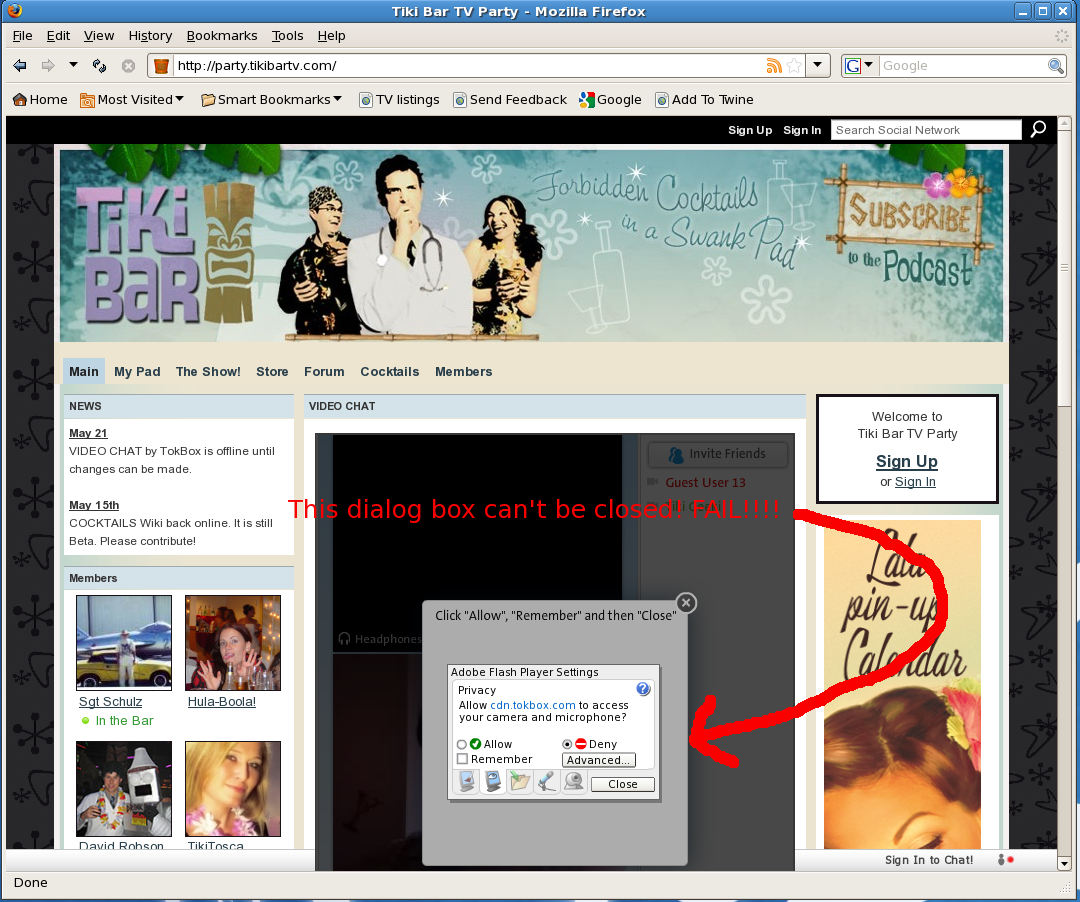
Emphasis added by me. Adobe is incorrect, the settings UI pops up when you visit a site using window mode "transparent" or "opaque" but can't be dismissed. If you right click on Flash area it will also pop up and stay there. There is no way they can pass this off as a security enhancement when the behavior only occurs in Linux. Come on Adobe admit it, it's a bug. You introduced a new mode but decided not to implement it properly in Linux. This behavior makes it extremely difficult to use Linux on Netbooks because they are so useful when you want to use sites like 12seconds.tv, tokbox.com and the like.
Click the images to see them full size.
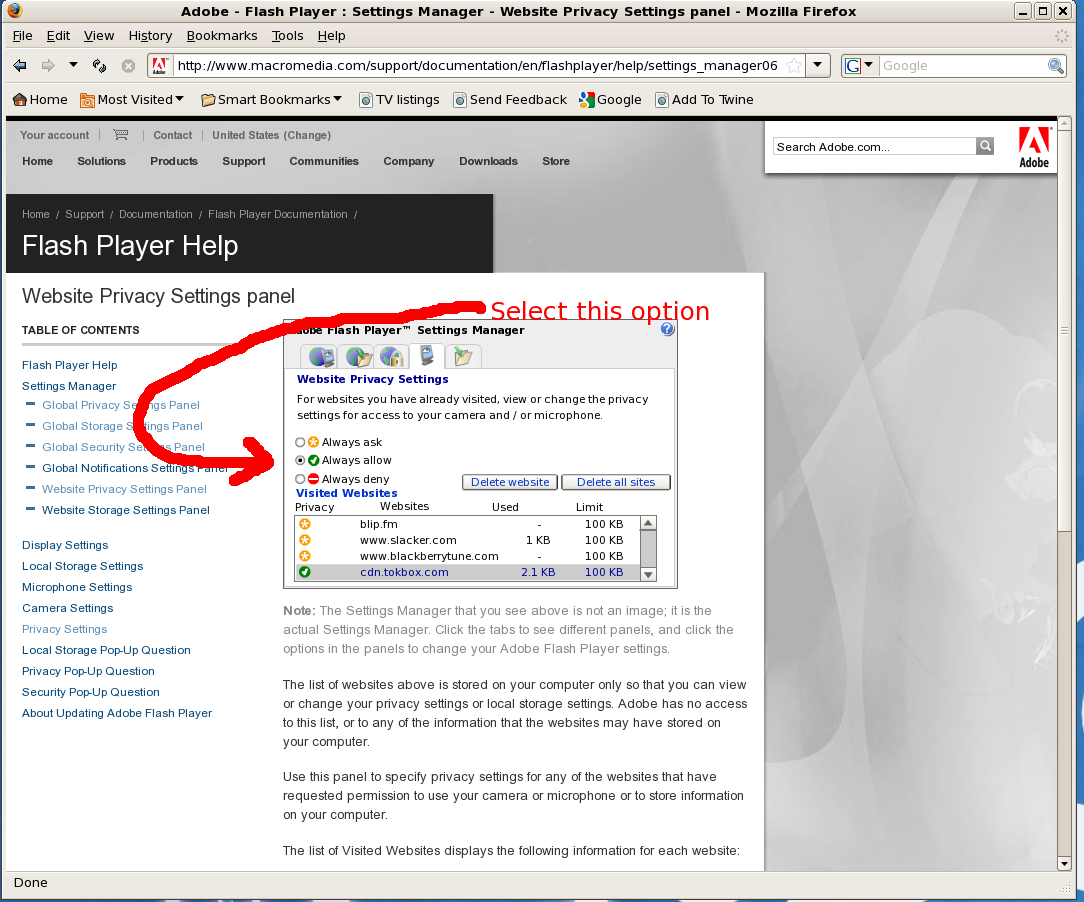
There are two workarounds, only one of which I would recommend. Go to http://www.macromedia.com/support/documentation/en/flashplayer/help/settings_manager06.html scroll down to the site you want to access and click always allow.
Here is a list of sites where you have this problem from ubuntuforums.org if you try to use your camera. Please add anymore you find in the comments.
- megavideo.com
- supernovatube.com
- stickam.com,
- ustream.com
12 comments
I thought it was just me. You deserve an award or something.
Archlinux64 + flash 10 + firefox + fluxbox.
Not to mention, flash settings does not recognize clicks in non gnome/kde managers.
The only question left is to ask how much Microsoft paid Adobe to do that, or, what did they threaten Adobe with? ("cut of their air supply")
THANK YOU for this work around! Same problem with BlogTV. Thought I was just being dumb. Installed all sorts of pulse audio BS to try and get it working. What a PITA.
EeePC 1000H
Eb3
Too quick to thank you for the work around. Adobe broke it real well. I can now start a video session to preauthorized sites but all I send is one poor quality frozen frame. If I attempt to bring up the settings console again it locks up the browser solid.
F@#$%^& Adobe.
Im new to linux, and discovered this very quickley. question though- is there a way to use a brower in any mode other than opaque or transparant?
Well Nice to see that somebody posting abt this, I was looking forward.
Add [ imo.im ] to the list of impacted sites. (Ubuntu9.10-64 + flash 10 + firefox + imo.im).
Great discovery. Only problem is the link to the first image points to the second
Mark
Thanks for pointing that out, the screwed up link is fixed.
Very Impressive, this discovery will help many people throughout the world, i really enjoyed my visit to your site, hoping for more latest updates soon.
What’s the other work around? I would actually like to just enable access for all websites. It’s a pain to enable each one individually.
I am having this same problem and I think this is the fix but no sites populate in that list, and i cant add any! Im not sure where to go to make it so that adobe can tell what sites Ive been to, I have so many addons that are designed to prevent just that! is there another way or do i have to disable them all temporarily?
Random photo
 |
